AI CFO Toolkit

Know where your assets are, without asking five people

Finance teams lose the first week of every month to reconciliation, balance collection and chasing differences. The systems that hold the answers already exist. What is missing is the layer that reads them together.

  • 8Capability modules
  • 5Screens on this page
  • 0Systems you have to replace

Book a finance automation conversationSee the three entry points

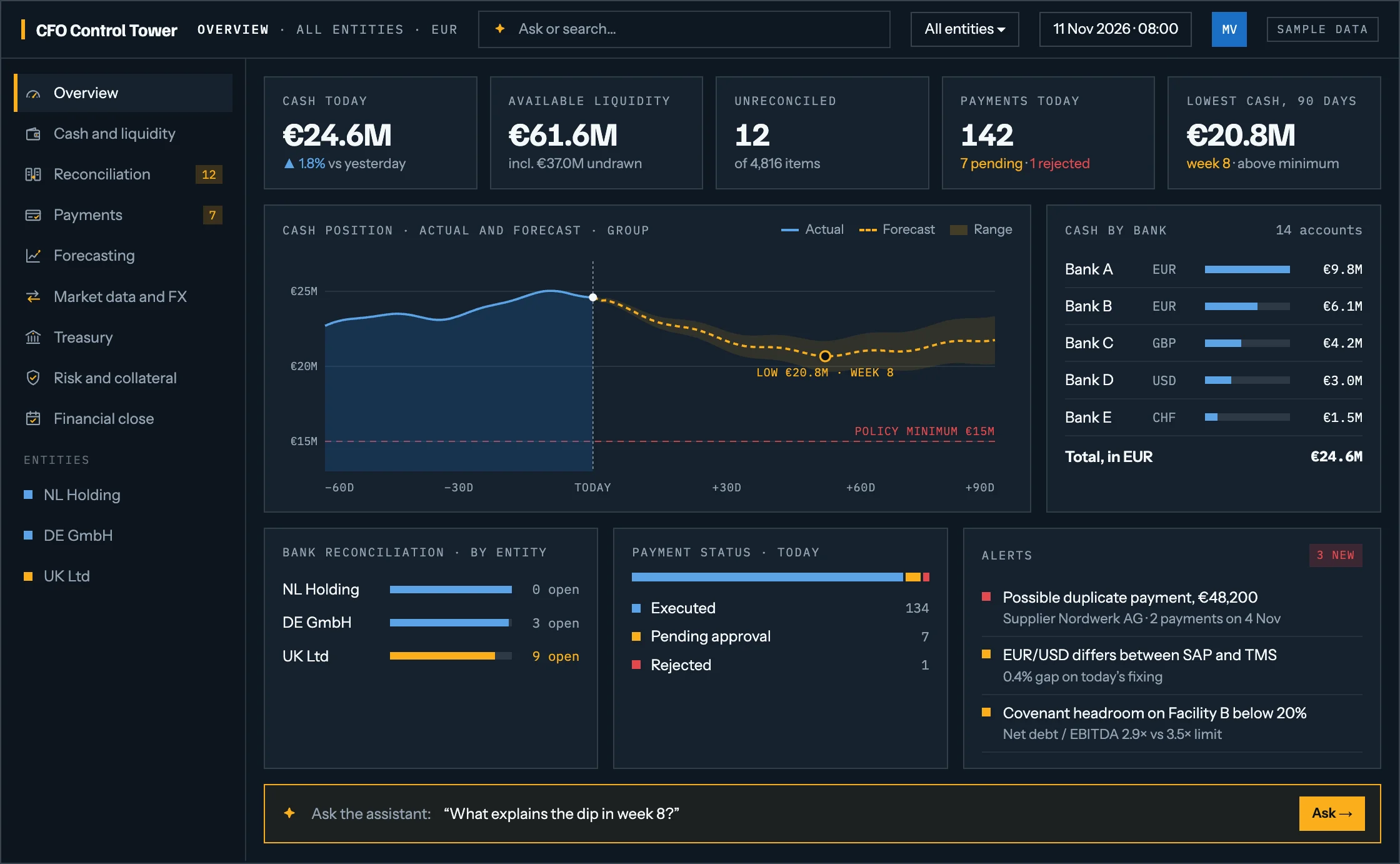
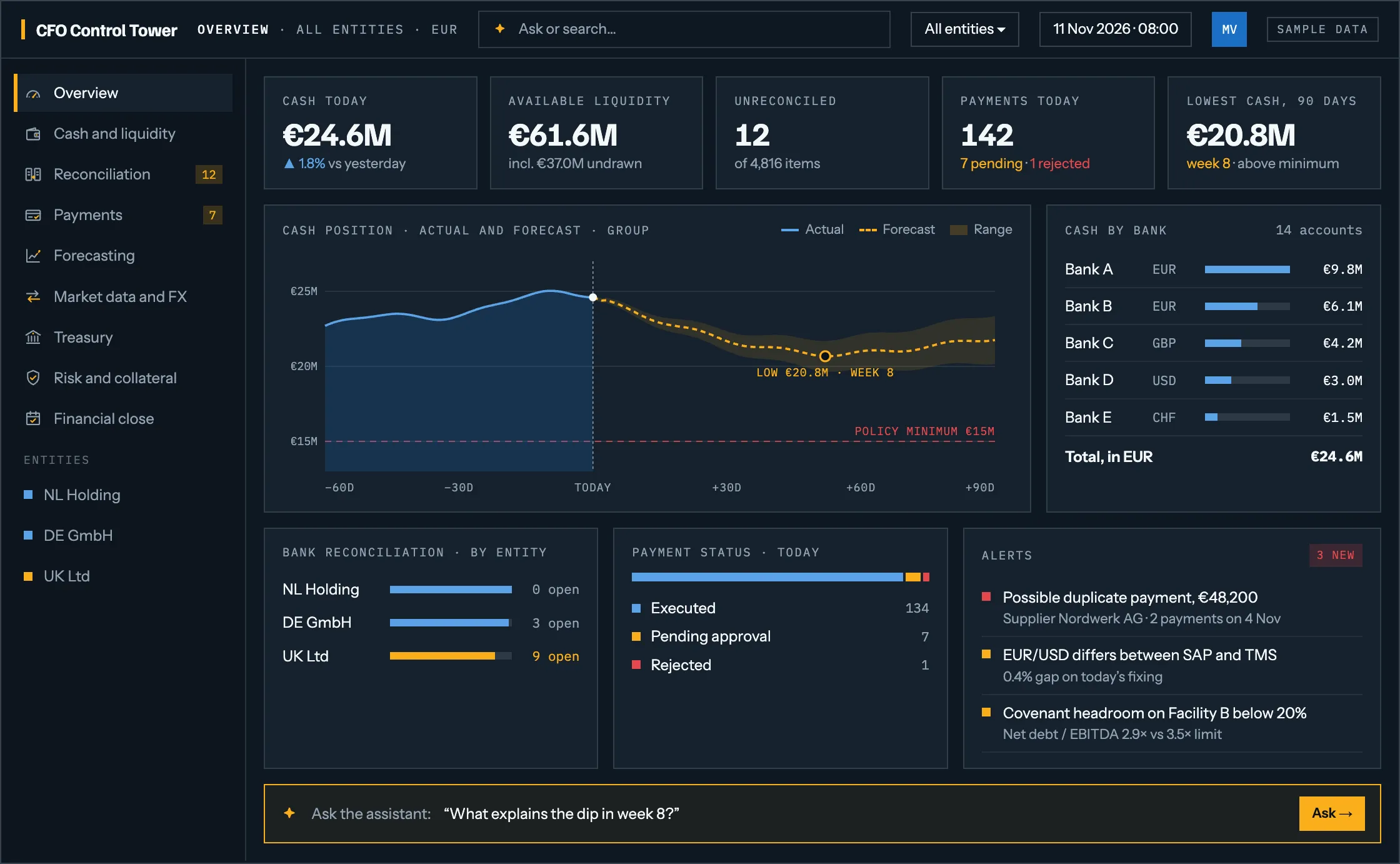
Open the full-size screen: A finance control tower screen: cash today, available liquidity, unreconciled items, payments today and the lowest cash point over 90 days, a chart of actual and forecast cash against a policy minimum, cash by bank across fourteen accounts, reconciliation status per entity, payment status for the day, three alerts including a possible duplicate payment, and a prompt to ask the assistant about the dip in week 8.
01 · Control tower · illustrative screen · sample data

The questions that take a day to answer

Most finance departments can answer all of these. The problem is how long it takes, and that the answer is out of date by the time it arrives.

  • How much cash do we hold today, across every entity and currency?
  • Which bank transactions are still unreconciled, and why?
  • Which payments are pending, rejected or possibly duplicated?
  • What is our expected cash position in 30, 60 and 90 days?
  • Which loans and deposits mature next quarter?
  • Are the same FX rates in use across all of our systems?
  • What explains the gap between the forecast and the actual cash flow?
  • All of them, answered from your own data, before the answer goes out of dateSee the assistant

This is our AI adoption and solutions practice pointed at one function. The underlying environment is the same: your own data, your own systems, guardrails and human approval. What changes is that it speaks finance.

The control tower

Eight modules over the systems you already run

Each one works on its own and each one feeds the next. Nobody buys all eight at the start, and we would advise against trying.

  • 01

    Cash and bank intelligence

    One consolidated view of every account, balance, currency and entity. Statements collected automatically, movements monitored daily, discrepancies raised rather than discovered.

    Available as a starting point

  • 02

    Reconciliation

    Bank transactions matched against ledger entries, invoices, payments and treasury deals. What does not match is explained and ranked, so the team works the exceptions instead of the whole file.

    Available as a starting point

  • 03

    Payments and controls

    Payments tracked from initiation to execution at the bank. Pending, rejected, delayed and possibly duplicated transactions surfaced while there is still time to act on them.

  • 04

    Forecasting

    Historical movements, receivables, payables and treasury positions combined into a short-term cash forecast and longer scenarios, so a liquidity gap is visible before it arrives.

  • 05

    Market data and FX

    Rates retrieved from the approved source, validated for completeness and plausibility, converted into the formats each downstream system expects, and distributed with a record of what went where.

  • 06

    Treasury positions

    Deposits, money market funds, loans, bonds and intercompany financing in one place, with interest accruals calculated and maturities monitored rather than diarised.

  • 07

    Risk and collateral

    Exposures, derivative valuations, counterparty limits and collateral positions monitored continuously, with bank valuations compared against the internal calculation and material differences flagged.

  • 08

    Close and reporting

    Accrual files, balance confirmations, period-end packs and the evidence behind them prepared in advance, with the missing pieces named while the close can still absorb them.

    Available as a starting point

Across all of them

A finance assistant that answers in plain language, shows the records behind the answer, and opens the exception rather than describing it.

02 · AI reconciliation

Only the exceptions reach your desk

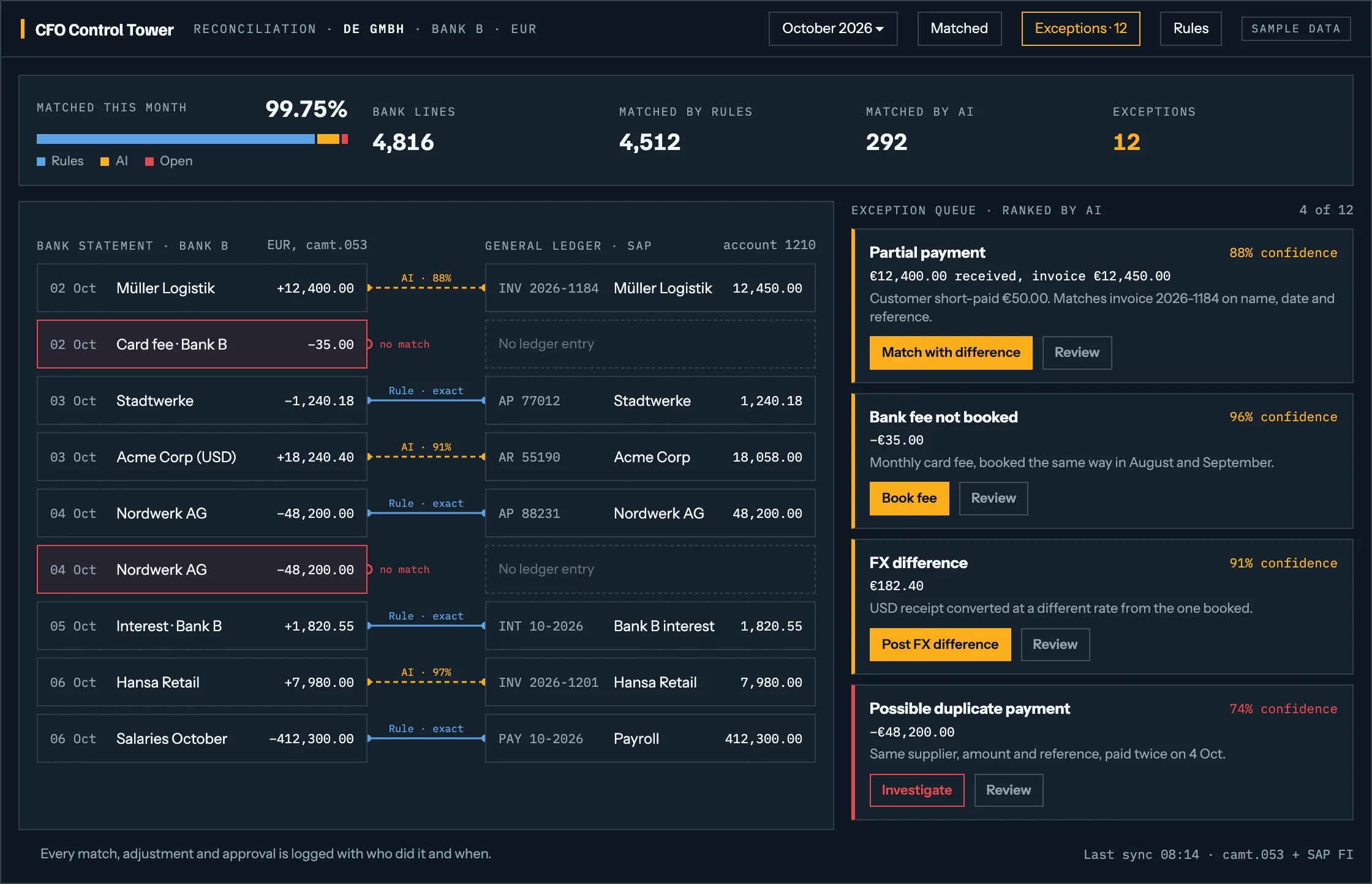
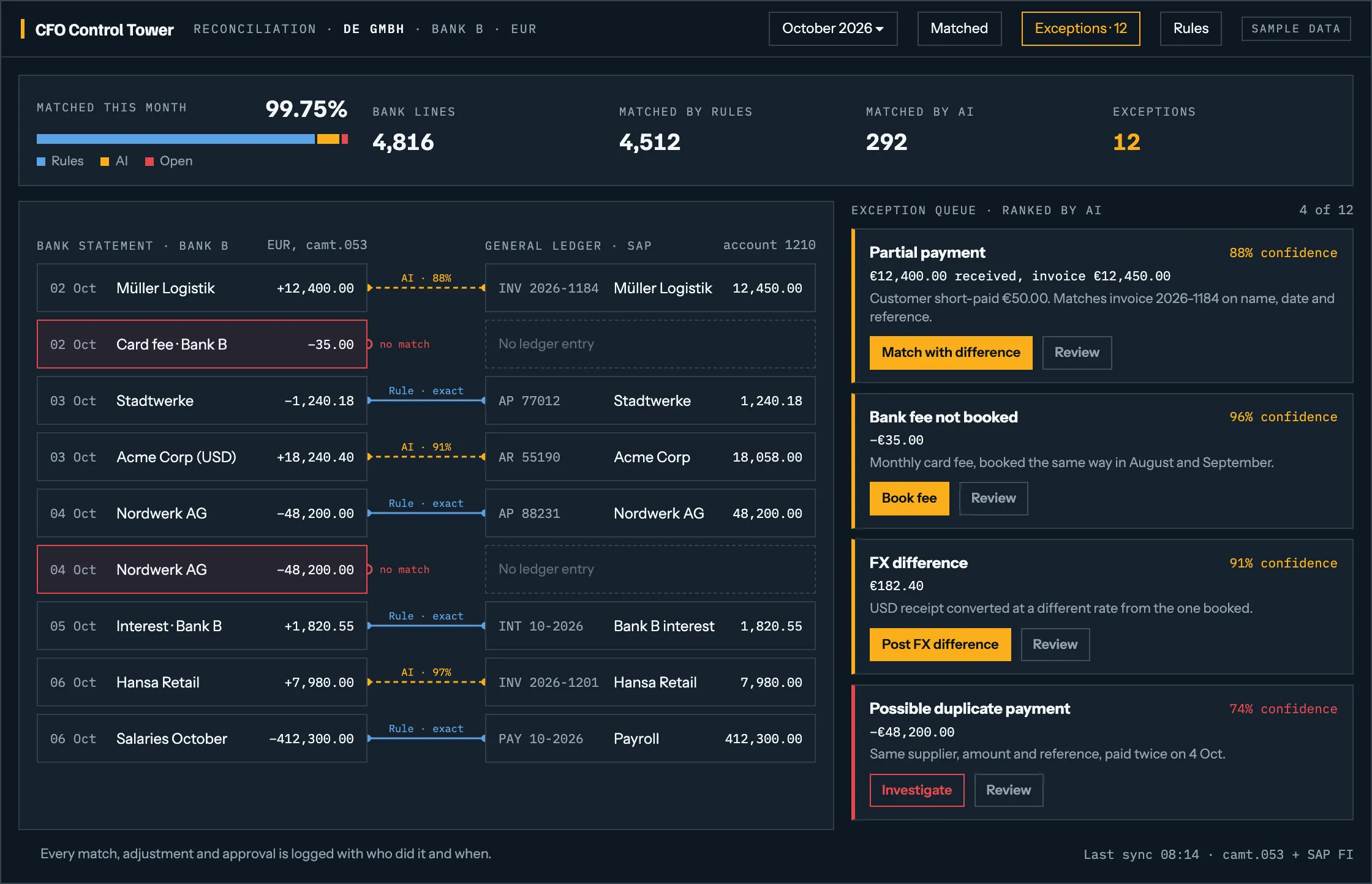
Rules match the routine lines, AI matches the rest, and what is left arrives ranked, with a likely cause and a proposed fix for someone to approve.

  1. Rules first, AI secondMost lines match on rules. AI handles the near-matches, such as partial payments and FX differences, and every match shows which one made it.
  2. Matches you can seeBank lines and ledger entries side by side, with the link and the reason for each match.
  3. A ranked exception queueOpen items arrive sorted by what needs attention first, each with its most likely cause.
  4. Logged, and duplicates caughtEvery match, adjustment and approval is recorded with who did it and when. The same supplier, amount and reference twice is flagged before the month closes.
Open the full-size screen: A reconciliation screen: 4,816 bank lines, 4,512 matched by rules, 292 matched by AI and 12 exceptions, with bank statement lines beside ledger entries and a ranked exception queue naming a partial payment, an unbooked bank fee, an FX difference and a possible duplicate payment.
Illustrative screen · sample data · tailored to each company

03 · Forecasting and scenarios

See the low point weeks before you reach it

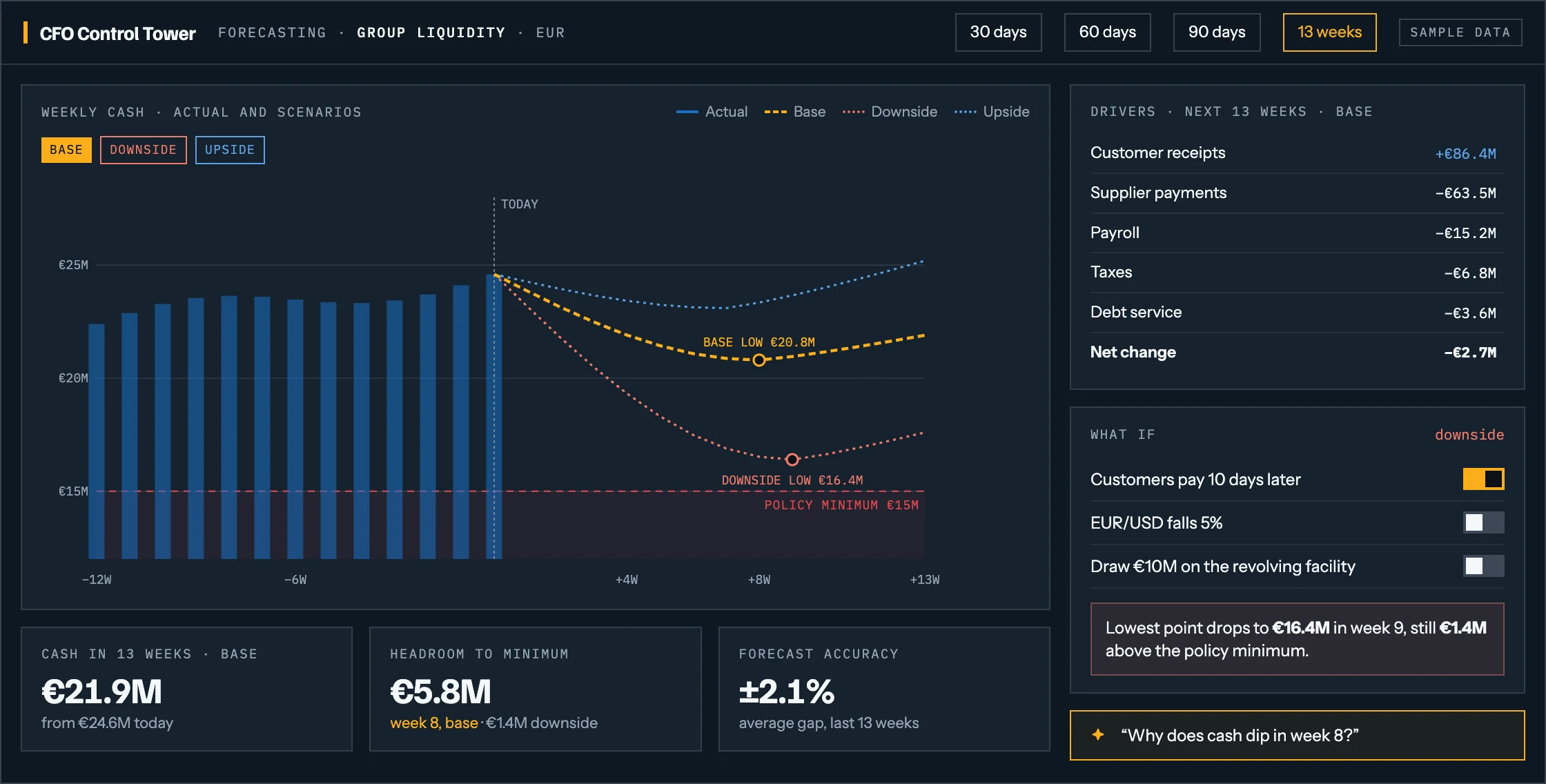
A rolling forecast built from your receipts, payments and debt service, with the scenarios a board asks for and the policy minimum always in view.

  1. Scenarios side by sideBase, downside and upside on one chart, over the horizon you plan on: 30, 60, 90 days or 13 weeks.
  2. The low point, against your minimumThe lowest cash point and the week it falls in are marked, together with the headroom to your policy minimum.
  3. Drivers, not just a lineWhich flows move the forecast: customer receipts, suppliers, payroll, taxes and debt service, each with its contribution.
  4. What-if in one click, accuracy on the recordLate payments, an FX move or a drawdown recalculated at once, and forecast against actual measured every week so trust is earned rather than assumed.
Open the full-size screen: A cash forecasting screen: thirteen weeks of actual cash as bars, then base, downside and upside scenarios as lines, with the base low of 20.8 million euro in week 8 marked against a 15 million euro policy minimum, a list of drivers, and what-if switches for late customer payments, an FX move and a facility drawdown.
Illustrative screen · sample data · tailored to each company

04 · AI CFO assistant

Ask a question. Get the answer, the evidence and a next step

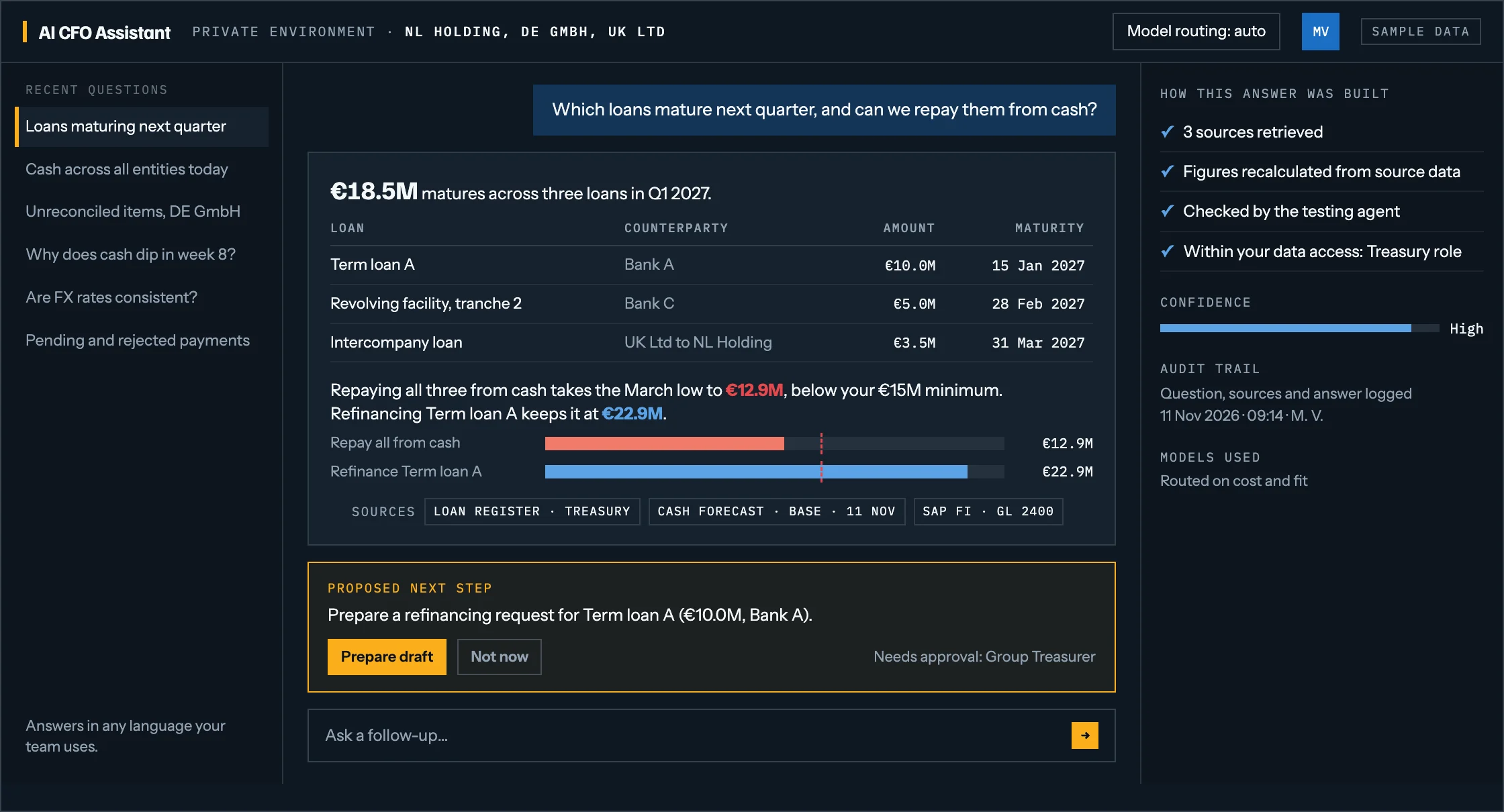
Ask in plain language and it answers from your own data, then takes the question one step further: not only what the figures are, but what to do about them.

  1. Plain-language questionsIn any language your team works in. No report to build and no query to write.
  2. Figures, not estimatesTables and comparisons calculated from source data, with the sources named on every answer so anyone can check it.
  3. A proposed next stepThe assistant can prepare the work, such as a refinancing request, but an authorised person approves it.
  4. Built to be trustedRetrieval from your own data, a testing agent that checks the answer, role-based access and a full audit trail.
Open the full-size screen: An assistant screen answering which loans mature next quarter: a table of three loans totalling 18.5 million euro, a comparison showing that repaying them all from cash would breach the policy minimum while refinancing one would not, the sources behind the figures, and a proposed refinancing draft that needs the group treasurer's approval.
Illustrative screen · sample data · tailored to each company

05 · Financial close

A close you can follow, and prove

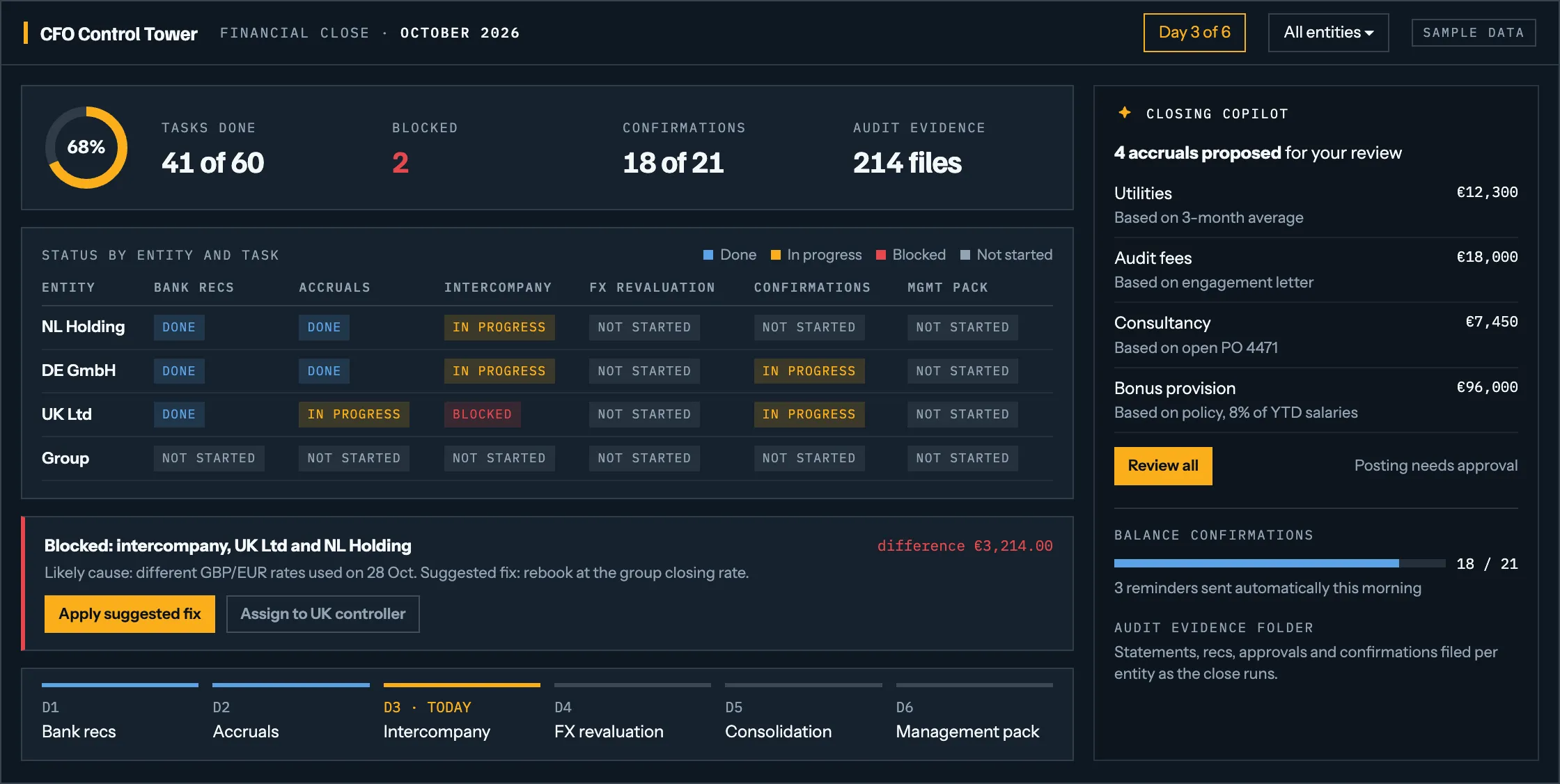
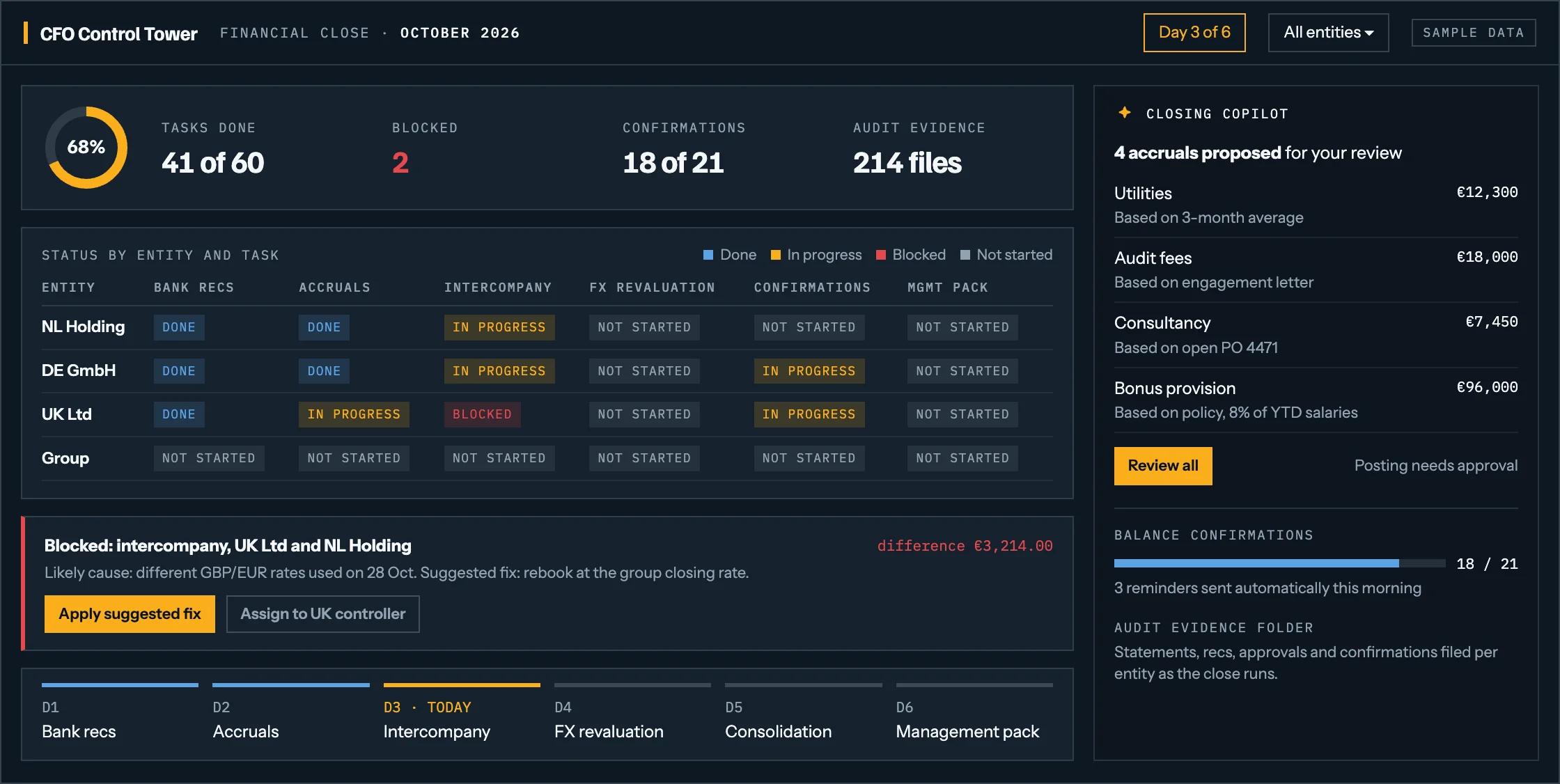
Every task, entity and blocker on one board, with a closing copilot that proposes accruals and collects the evidence an auditor will ask for.

  1. Status by entity and taskDone, in progress, blocked or not started, for every entity, at a glance rather than in a chased spreadsheet.
  2. Blockers with a likely causeIntercompany differences and other blockers arrive with a suggested fix and an owner, not only a red flag.
  3. Accruals proposed, not postedThe copilot prepares accruals and shows the basis for each. Posting needs an approval from someone authorised to give it.
  4. Confirmations and evidenceBalance confirmations chased automatically, and the audit evidence filed per entity as the close runs rather than afterwards.
Open the full-size screen: A financial close screen on day three of six: 41 of 60 tasks done, a status grid per entity and task, a blocked intercompany difference with its likely cause and a suggested fix, four accruals proposed for review with the basis for each, and the balance confirmations collected so far.
Illustrative screen · sample data · tailored to each company

Built for your company, not picked from a template.Every figure on those screens is sample data. What gets built is shaped around your own banks, systems, entities, rules and reports, and it starts with the one module that gives your team the most time back.

AI insights

From the numbers to what they mean

A dashboard reports what happened. The work worth paying for is the next sentence: why it happened, whether it matters, and what would have to change. That is what the models are pointed at.

  1. Patterns learned from your own historyPayment behaviour per customer, supplier terms as they are actually used, seasonality and your own past reconciliations. A figure is compared against your record, not against an industry benchmark that does not know your business.
  2. Anomalies, named and rankedA duplicate payment, a rate that differs between two systems, a cost line out of step with its own three-month average. Each one arrives with how unusual it is, what it probably is, and the records that make the case.
  3. Explanations, not just alertsAny number on any screen can be opened: which flows moved the forecast, which entity moved them, which invoice sits behind the difference. An alert nobody can explain gets switched off within a month.
  4. Written up in language a board readsThe same answer as a sentence rather than a chart, so the commentary in the management pack starts from something checked rather than from a blank page.

Start where it costs you most

Three starting points, chosen because each can be demonstrated against a sample of your own data inside the first engagement rather than described in a deck.

Entry point 01

AI reconciliations

For a team that spends the first week of every month matching transactions.

Automated matching between bank movements and the ledger, with the unmatched remainder explained, grouped and prioritised. The measure of success is not the match rate on its own but how much of the exception queue a person still has to read.

What's included
  • Matching rules derived from your own historical reconciliations, not from a generic template
  • Exceptions grouped by probable cause, with the supporting records attached
  • A reconciliation dashboard per account, entity and period
  • An audit trail showing what was matched automatically, by which rule, and who approved the rest
See the screen it builds

Entry point 02

Cash visibility

For a CFO who currently answers the cash question by email.

Balances, movements and liquidity across every account and entity in one view, refreshed without anyone logging into a banking portal. The quickest of the three to stand up, and usually the one that gets the others funded.

What's included
  • Automated collection of statements and balances from the banks you already use
  • Consolidated position by entity, currency and account, with movements since yesterday
  • Alerts on balances, unexpected movements and failed collections
  • A position that can be read on a phone before a board call
See the screen it builds

Entry point 03

Month-end close assistant

For an accounting team whose close depends on who is in the office.

Accruals, balance checks, confirmations and the supporting documentation prepared ahead of the close, with the gaps named early. It does not sign anything off. It makes sure the person signing has everything in front of them.

What's included
  • Accrual and interest calculations prepared from the underlying positions
  • Balance and intercompany checks run before the close rather than during it
  • A checklist that knows what is missing, and from whom
  • Period-end packs assembled with their evidence attached
See the screen it builds

How it gets built

Five steps, and the first one is not technical

We start with the people doing the reconciliations, because the rules that matter are the ones nobody has written down.

  1. Assess

    Sit with the people doing the reconciliations and the close. Map what they actually do, which systems they touch and where the hours go.

  2. Connect

    Integrate the bank feeds, the ledger, the treasury system and the market data source through their existing interfaces. No replacement programme.

  3. Automate

    Build the matching, validation and preparation steps, with agents handling the repetitive judgement and escalating the rest.

  4. Monitor

    Dashboards, exceptions, alerts and audit evidence, so the finance team can see what the system did and defend it to an auditor.

  5. Improve

    Measure the exception rate and the hours recovered, feed the corrections back into the rules, and extend into the next module.

What it is not allowed to do

Automation in finance is only worth having if it can be explained to an auditor. Four limits we build in from the start.

  • Nothing moves moneyThe toolkit reads, matches, prepares and recommends. Payment release and journal posting stay with the people and the systems that hold those rights today.
  • Every output is traceableEach match, rate and calculation records its source, its rule and its timestamp, so an auditor can follow it back without asking us.
  • A human approvesAnything that becomes a booked figure or an external file passes an authorised person first. Approval is part of the workflow, not a policy written beside it.
  • Your data stays yoursThe environment is built on your own data in a tenancy you control, and we can tell you which model saw what. No training on your financial records.

Sample data · drag or scroll inside the image to read it · Esc to close

Bring one process, and we will tell you what we would automate

Thirty minutes on your reconciliation, your close or your cash position. You leave with an honest answer about what is worth automating first, including the case where the answer is nothing yet.

Book a finance automation conversation